Summary
As part of the implementation of the One Big Beautiful Bill Act (OBBB), the IRS added new fields to form 1040. These changes were implemented in SIPS in Q4 2025. This created a situation where Cashflow and Tax Advisor scenarios for 2025 and all future years in SIPS were created using the previous (now out of date) tax code. This new button in SIPS allows users to easily convert these tax scenarios to the new tax code with minimal effort.
SIPS Implementation Summary
- New button on the Cashflow and Tax Advisor screen
- New popup window appears in the Cashflow and Tax Advisor screen when the new button is pressed.
Detailed Changes
- A new button (Convert TCJA to OBBB) on the Cashflow and Tax Advisor screen now appears when in Edit mode

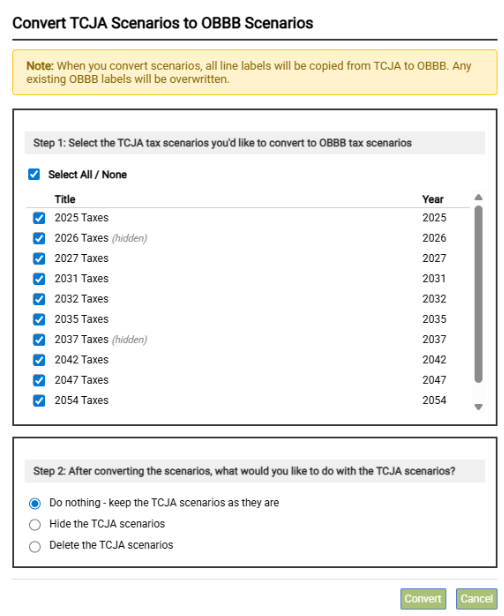
- Pressing the Convert TCJA to OBBB button triggers the conversion popup menu
Conversion Menu Details
- Step 1 – Scenario Selection
- In the top portion of the menu all years that are eligible for conversion appear
- The title displays the scenario name
- Year is the tax year of the scenario
- Scenarios which are hidden are notated as such
- Any scenarios that are checked will be converted
- In the top portion of the menu all years that are eligible for conversion appear
- Step 2 – Existing Scenario Disposition
- Do nothing – the source TCJA scenarios will continue to appear on the Cashflow and Tax Advisor screen
- Hide the TCJA Scenarios – when the convert button is pressed, all checked scenarios will be automatically hidden (i.e. the hide button is pressed) from view
- These scenarios can be viewed by pressing the uncondensed button
- To unhide them, press the unhide button
- Delete the TCJA scenarios – when the convert button is pressed, all checked scenarios will be deleted from SIPS. NOTE: this action cannot be undone and deleted scenarios cannot be recovered.
- Convert – click this button to complete the conversion
- Cancel – click this button the cancel the conversion – no changes will be made
